Banish WFH Back Pain: Your Ultimate Step-by-Step Relief Guide
How to Reduce Back Pain While Working From Home: Your Step-by-Step Guide Stop Back Pain While Working From Home: Your Easy Guide Working from home offers flexibility, but it can also bring a new challenge: persistent back pain. If you find yourself constantly shifting, stretching, or feeling a dull ache by the end of your […]

Stop Back Pain While Working From Home: Your Easy Guide
Working from home offers flexibility, but it can also bring a new challenge: persistent back pain. If you find yourself constantly shifting, stretching, or feeling a dull ache by the end of your workday, you’re not alone. The good news is that reducing back pain while working from home is achievable with a few simple adjustments to your environment and habits.
This guide will walk you through practical, easy-to-follow steps to transform your home office into a pain-free zone. You’ll learn how to optimize your workspace, improve your posture, and incorporate essential movement to keep your back happy and healthy.
Quick Summary: Key Steps to Beat Back Pain
Here’s a snapshot of how to reduce back pain while working from home:
- **Optimize Your Setup:** Adjust your chair, desk, and monitor for proper ergonomic support.
- **Mind Your Posture:** Consciously sit tall, keeping your spine aligned and shoulders relaxed.
- **Move Frequently:** Take short, regular breaks to stand, walk, and stretch throughout your day.
Step-by-Step Guide to Reducing Back Pain While Working From Home
1. Optimize Your Workspace Ergonomics
Your home office setup plays a huge role in your back health. Small changes can make a big difference.
-
Choose the Right Chair
Invest in an ergonomic chair if possible, or make the most of what you have. Your chair should:
- **Support your lower back:** Look for a chair with built-in lumbar support, or add a cushion. This maintains the natural curve of your spine.
- **Allow adjustable height:** Your feet should be flat on the floor (or a footrest), with your knees at about a 90-degree angle, just slightly below your hips.
- **Have armrests:** Use armrests to support your forearms, keeping your shoulders relaxed and not hunched.
-
Adjust Your Desk Height
Your desk should allow your forearms to be parallel to the floor when you’re typing. If your desk isn’t adjustable, you might need to raise your chair and use a footrest, or try a desk riser to achieve the right height.
-
Position Your Monitor Correctly
Place your monitor directly in front of you, about an arm’s length away. The top of your screen should be at eye level. This prevents you from craning your neck up or down, which strains your upper back and neck.
-
Use Your Keyboard and Mouse Smartly
Keep your keyboard and mouse close to your body. Your wrists should be straight, not bent up or down. Consider an ergonomic keyboard and mouse if you experience discomfort in your wrists or forearms.
2. Master Your Posture
Even the best ergonomic setup won’t help if you’re constantly slouching. Good posture is key to reducing back pain while working from home.
-
Sit Tall and Engage Your Core
Imagine a string pulling you gently upwards from the top of your head. Sit with your back straight, but not stiff. Lightly engage your abdominal muscles – this supports your spine.
-
Relax Your Shoulders
Avoid hunching your shoulders up towards your ears. Let them drop naturally, pulling them slightly back.
-
Keep Your Head Aligned
Your head should be balanced directly over your spine, not jutting forward. This prevents neck and upper back strain.
-
Practice Regularly
Good posture takes practice. Set reminders to check your posture every hour until it becomes a natural habit.
3. Take Regular Breaks and Move Your Body
Sitting for long periods is one of the biggest culprits of back pain. Regular movement is essential.
-
Stand Up Every 30-60 Minutes
Set a timer to remind you to stand up every 30 to 60 minutes. Even just standing for a minute or two can make a difference. This relieves pressure on your spine and activates different muscles.
-
Walk Around
During your breaks, walk a short distance. Get a glass of water, walk to another room, or even just pace for a few minutes. This improves circulation and keeps your joints lubricated.
-
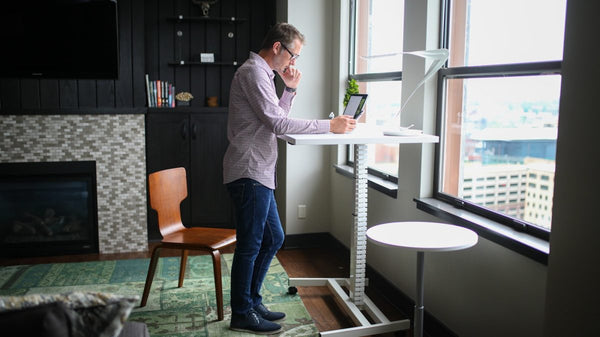
Consider a Standing Desk
If prolonged sitting is a major issue, a standing desk or a desk converter allows you to alternate between sitting and standing, which is excellent for back health.
4. Incorporate Gentle Stretches into Your Day
Stretching helps keep your muscles flexible and reduces stiffness. You don’t need a full yoga session; a few simple stretches at your desk or during breaks can work wonders.
-
Back Twists
While seated, gently twist your torso to one side, holding onto the back of your chair for support. Hold for 15-30 seconds, then repeat on the other side. This mobilizes your spine.
-
Cat-Cow Stretch (Modified)
On your hands and knees (or seated, reaching forward), gently arch your back on an inhale (cow) and then round it on an exhale (cat). This improves spinal flexibility.
-
Hamstring Stretch
Tight hamstrings can pull on your pelvis and contribute to lower back pain. While standing or seated, gently reach towards your toes (or knee) to feel a stretch in the back of your thighs.
-
Neck Rolls and Shoulder Shrugs
Gently roll your head from side to side and perform shoulder shrugs to release tension in your upper back and neck.
5. Listen to Your Body and Address Pain Early
Don’t ignore discomfort. Persistent pain is your body telling you something isn’t right.
-
Adjust Immediately
If you start to feel discomfort, don’t wait. Make an immediate adjustment to your posture, take a break, or perform a gentle stretch.
-
Stay Hydrated
Drinking enough water is important for overall health, including the health of your spinal discs. Keep a water bottle handy.
-
Know When to Seek Help
If your back pain is severe, constant, or doesn’t improve with these tips, it’s important to consult a doctor or physical therapist. They can provide a personalized assessment and treatment plan.
Tips & Common Mistakes for a Pain-Free WFH Experience
Helpful Tips:
- **Set Up a Dedicated Workspace:** Avoid working from your couch or bed, as these don’t provide proper support.
- **Use a Timer App:** Many apps can remind you to take breaks and stretch.
- **Light Exercise:** Incorporate general physical activity like walking, swimming, or yoga into your non-work hours to strengthen your core and back muscles.
- **Mindfulness:** Pay attention to how your body feels throughout the day. This can help you catch poor habits early.
Common Mistakes to Avoid:
- **Slouching:** The most common culprit. Regularly check and correct your posture.
- **”Marathon” Sitting:** Sitting for hours without moving stresses your spine.
- **Ignoring Pain:** Don’t push through discomfort; it’s a warning sign.
- **Improper Chair Height:** Feet dangling or knees too high/low.
- **Poor Monitor Placement:** Straining your neck to look up, down, or sideways.
- **Working from Unsupportive Surfaces:** The couch or bed might seem comfy, but they lack the structure your back needs.
Key Takeaways: How to Reduce Back Pain While Working From Home
Successfully reducing back pain while working from home boils down to a few core principles:
- **Ergonomics are Essential:** Your chair, desk, and monitor need to be set up to support your body correctly.
- **Posture Matters:** Conscious effort to maintain good posture is vital for spinal health.
- **Movement is Medicine:** Regular breaks and gentle stretches prevent stiffness and promote circulation.
- **Listen to Your Body:** Address discomfort promptly and seek professional help if pain persists.
Frequently Asked Questions
What is the easiest way to reduce back pain while working from home?
The easiest and most impactful way is a combination of two things: optimizing your chair for good lower back support and taking frequent short breaks (every 30-60 minutes) to stand and move. These two actions alone can significantly reduce strain.
How quickly can I expect to feel relief from back pain after making changes?
You might feel some immediate relief once you adjust your ergonomic setup and correct your posture. For more significant and lasting improvement, consistency is key. Expect to notice a substantial difference over several days to a few weeks as your body adapts to better habits and your muscles strengthen.
What if my back pain persists despite making all these changes?
If your back pain is severe, constant, or doesn’t improve after consistently applying these steps for a few weeks, it’s crucial to consult a healthcare professional. A doctor or physical therapist can diagnose underlying issues and recommend a personalized treatment plan, which might include specific exercises, therapies, or medical interventions.
Conclusion: Empowering Your Pain-Free Workday
Reducing back pain while working from home is not just about comfort; it’s about investing in your long-term health and productivity. By following these practical steps—optimizing your workspace, mastering your posture, incorporating movement, and listening to your body—you can transform your work-from-home experience.
Take control of your comfort today. Start with one or two changes and gradually build healthier habits. Your back will thank you!
Looking for more inspiration? Explore the full Mavigadget Gift Ideas Collection for creative solutions.
Filed under
Written by
Arthur
Health & Fitness, MaviGadget
Arthur writes for the MaviGadget Journal, testing the gadgets that promise to change your day and reporting honestly on the ones that actually do.