Why Choose a Scorpion Gaming Chair From MaviGadget?
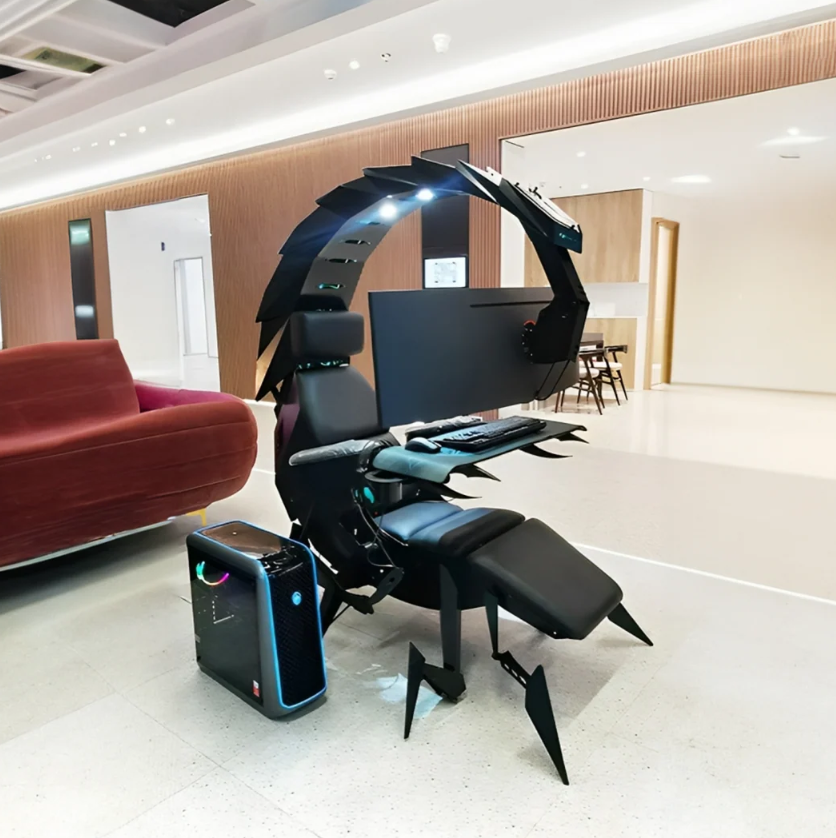
The Zero Gravity Massage Ergonomic Scorpion Gaming Chair gives a gaming or work setup a bold cockpit-style centerpiece with comfort-led features.

Why Choose a Scorpion Gaming Chair From MaviGadget?
A scorpion gaming chair is not a typical desk chair with a few gaming-inspired details. It is a full-scale cockpit concept: an enclosed-looking workstation that puts the screen, controls, and seating position into one focused zone. For someone building a serious game room, streaming setup, or high-impact home office, it creates a different kind of experience from a standard chair and separate desk.
The Zero Gravity Massage Ergonomic Scorpion Gaming Chair is made for that kind of setup. Its dramatic profile is the first thing people notice, but its real appeal is the way it brings seating, monitor placement, and a sense of personal space together. Here is why choosing this scorpion gaming chair from MaviGadget makes sense when you want a statement piece that also supports long sessions.
It makes the whole setup feel intentional
Most gaming spaces are assembled piece by piece: a chair, a desk, monitor arms, cable runs, and lighting. That can work beautifully, but it also requires many decisions. A scorpion gaming chair changes the starting point. Its cockpit-like silhouette becomes the visual center of the room, so the rest of the setup can be arranged around it.
This is useful for a dedicated gaming room, an editing suite, or a work-from-home space that needs a clear boundary between focused time and the rest of the day. The chair gives the room a purpose immediately. Instead of adding multiple decorative objects to create impact, you can let one functional piece set the tone.
The design also photographs well in a setup reveal, stream background, or home office refresh. Its sculptural form gives the room depth, especially when paired with simple lighting and a clean surrounding wall. Keep the rest of the space controlled and the chair becomes a deliberate centerpiece rather than visual clutter.
A cockpit layout can improve screen focus
A conventional desk keeps your monitor, keyboard, and chair as separate elements. A cockpit-style arrangement brings those elements closer together in a more unified viewing zone. That can make it easier to stay visually focused on the screen during gaming, creative work, or long planning sessions.
The benefit is not about forcing one posture all day. It is about giving you a structured environment that you can adjust to fit your activity. Before ordering, measure your available footprint carefully and plan where the chair will sit in relation to outlets, windows, and walkways. Give yourself clearance for entering, leaving, and adjusting the monitor area comfortably.
A good setup starts with the basics:
Place the chair where the screen will not catch harsh glare.
Leave room behind and beside it for access and cleaning.
Plan cables before the chair arrives, not after everything is in place.
Those practical steps protect the clean, immersive effect that makes a scorpion gaming chair appealing in the first place.
Comfort features matter beyond the visual impact
A dramatic gaming chair should still be judged by how it supports a real routine. The Zero Gravity Massage Ergonomic Scorpion Gaming Chair combines a reclining, zero-gravity-inspired seating concept with ergonomic shaping and a massage function. These features can make a long session feel more considered, whether you are gaming, working on a creative project, or watching a movie.
Comfort is personal, so it is worth thinking about your own habits. Do you sit for shorter competitive sessions, long weekend campaigns, design work, or a mix of everything? A chair with an adjustable, supportive setup is especially valuable when your activity changes during the day. You may want a more upright position for a focused task and a more relaxed configuration for downtime.
Treat the massage feature as an added comfort option, not a substitute for regular breaks. Stand up, stretch, hydrate, and reset your screen distance during long sessions. A premium chair supports the space around those habits; it does not remove the need for them.
MaviGadget makes the product link clear and direct
When you are considering a high-impact piece of furniture, it helps to have a direct route to the exact product rather than sorting through generic inspiration. The MaviGadget product page for this chair gives you a clear destination for the Zero Gravity Massage Ergonomic Scorpion Gaming Chair, so you can review the design and consider how it fits your room before making a decision.
Use the product page alongside your own room measurements. Note the position of doors, radiators, shelving, and power access. Think through where a monitor would sit and how you would enter the seat. A few minutes of planning will tell you far more than an empty corner can.
This is also the point to decide whether the chair suits the role you want it to play. In a minimal office, it can become a single bold anchor. In a full gaming room, it can sit alongside mood lighting, display shelves, and carefully managed cables. Either way, it deserves enough space to be used comfortably and seen properly.
Build the room around it, not against it

A scorpion gaming chair already has strong visual energy. Pair it with a restrained palette—black, charcoal, deep blue, or warm wood—to keep the room balanced. Add lighting that is easy on the eyes and avoid placing several competing statement pieces nearby. The room will feel more polished if the chair remains the dominant form.
For a compact space, use wall-mounted storage and keep the floor as open as possible. For a larger room, create zones: the cockpit area for screens and seating, a separate shelf or cabinet for accessories, and a clear path between them. This layout prevents the setup from swallowing the whole room.
Cable management has an outsized effect here. A few neatly routed power and display cables preserve the futuristic impression. Loose cords can make even an impressive piece look unfinished. Plan the cable path early, leave service access where needed, and use simple organizers that match the rest of the setup.
It can support more than gaming
The name may say gaming, but the chair’s use can extend to any screen-centered activity. Video editing, music production, 3D work, streaming, and extended media viewing all benefit from a deliberate screen environment. The key is to set the monitor height, keyboard position, and seating angle for the task in front of you.
If you use the chair for work as well as entertainment, create a short transition ritual. Clear cups and loose accessories, return the desk surface to order, and set the screen arrangement for the next task. That small reset keeps the chair from becoming a place where work and leisure blur into one long session.
Is a scorpion gaming chair right for you?
This is a product for someone who values immersive design as much as everyday usability. It is not intended to disappear into a room. It is built to be noticed, to frame a screen setup, and to give a gaming or work area its own identity.
Choose it when you have enough room, want a bold centerpiece, and are ready to plan the setup around the chair. The Zero Gravity Massage Ergonomic Scorpion Gaming Chair from MaviGadget offers an unusually distinctive way to bring comfort, design, and a cockpit-like feel into one place.
FAQ
Why choose a scorpion gaming chair instead of a standard chair?
A scorpion gaming chair creates a cockpit-style focal point that can unify your seating and screen setup while adding a distinctive design element to the room.
What should I measure before buying?
Measure floor space, door clearance, access paths, nearby outlets, monitor location, and room around the chair for entering and cleaning.
Can this chair be used for work as well as gaming?
Yes. It can suit screen-centered work such as editing, design, streaming, and planning when the monitor and seating position are arranged for the task.
How should I style the room around it?
Keep the palette simple, manage cables carefully, leave open floor space, and let the chair remain the room’s main visual statement.
Často kladené dotazy
Why choose a scorpion gaming chair?
It creates a cockpit-style focal point that can unify screen, seating, and room design.
What should I measure before buying?
Measure floor space, door clearance, access paths, outlets, and the intended monitor position.
Can it be used for work?
Yes. It can suit screen-centered work such as editing, design, streaming, and planning.
Zařazeno pod
Napsal
Mavigadget
Tech & Gadgets, MaviGadget
Mavigadget píše pro MaviGadget Journal, testuje gadgety, které slibují, že vám změní den, a upřímně informuje o těch, které to skutečně dokážou.


