Tech & Gadgets
From Idea to 3D Model: How AI Makes 3D Creation Easier for Beginners

Creating a 3D model traditionally requires specialized software, technical knowledge, and hours of manual work. AI-assisted tools are changing that process by allowing beginners to generate initial 3D assets from written descriptions or reference images.
This does not eliminate the need for human judgment. Instead, it makes early experimentation faster and gives more people an accessible starting point for 3D creation.
Key Takeaways
AI can generate initial 3D models from text prompts or images.
Clear prompts usually produce more relevant results.
Generated assets should be checked for shape, topology, texture, and scale.
Different export formats serve different workflows.
AI works best as a creative assistant rather than a replacement for 3D skills.
Why Has 3D Creation Traditionally Been Difficult?
Conventional 3D modeling involves several distinct skills. A creator may need to understand geometry, sculpting, topology, UV mapping, materials, lighting, and rendering before producing a usable asset.
Professional software also presents a steep learning curve. Even a relatively simple object can require many adjustments, especially when the model needs to be animated, placed in a game, displayed online, or prepared for printing.
These challenges can discourage beginners who want to visualize an idea but do not need complete control over every polygon. AI-assisted generation addresses this gap by simplifying the first stage of the workflow.
How Does AI Generate a 3D Model?
AI 3D generators commonly accept either a written prompt or a reference image. The system interprets the input and produces a model with geometry and, in many cases, an accompanying texture.
A platform such as Meshy gives creators two accessible starting points without requiring them to build every object manually from an empty scene. Meshy’s Text to 3D capability can generate an initial asset from a written description, while its Image to 3D capability can use a reference image as the visual starting point. Creators can then evaluate the result and refine the concept through additional iterations.
The output should be treated as a first draft. Results can vary depending on the clarity of the input, the complexity of the object, and the intended visual style.
How Should Beginners Write a Text Prompt?
An effective prompt should explain what the object is before describing its smaller details. A practical structure includes:
Asset type
Overall shape
Primary materials
Defining visual features
Art style
Intended use or setting
For example, “a chair” provides little direction. A more useful prompt might be:
A compact futuristic office chair with a curved metal frame, dark fabric cushions, adjustable armrests, and a clean industrial design.
When using Meshy’s text to 3D workflow, creators should focus on visible information such as shape, material, color, defining features, and art style. Background stories, emotions, or abstract themes are only useful when they influence the model’s appearance.
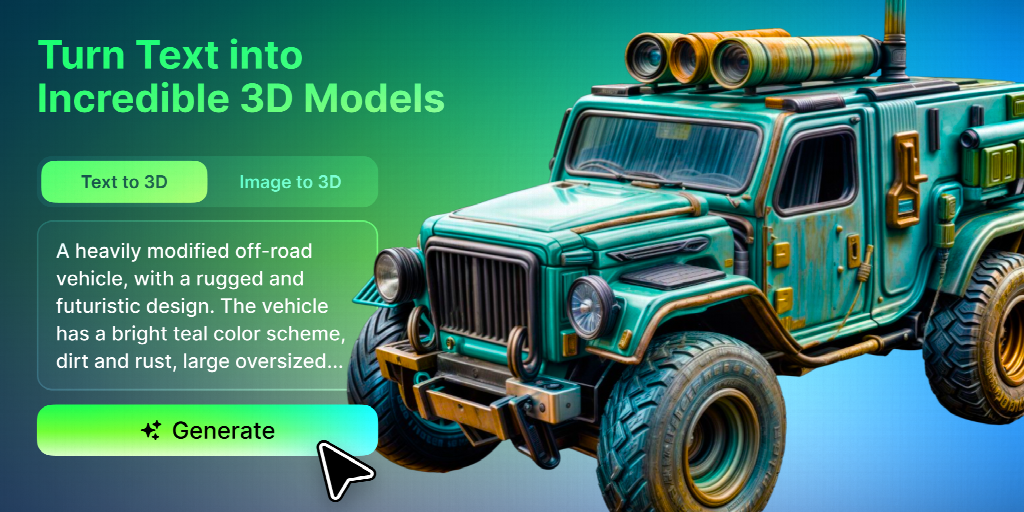
It is also better to generate one object at a time. A prompt requesting an entire room with furniture, decorations, and characters creates more opportunities for unclear geometry.
When Should You Use a Reference Image?
Meshy’s Image to 3D capability can be helpful when the creator already has a sketch, concept image, or photograph. Instead of relying only on a written description, Meshy uses the reference image to guide the initial model’s proportions, colors, silhouette, and visible surface details.
For better results with Meshy Image to 3D, use a reference with a clear subject and a simple background. The object should not be heavily obscured, cropped, or surrounded by unrelated items, and a three-quarter view often communicates more of its overall form than a flat front view.
However, one image cannot show every side of an object. Meshy may need to interpret the back, underside, or other hidden details, so the generated model should be reviewed from multiple angles and refined rather than treated as a complete technical reconstruction.
What Should You Check After Generation?
The first step is to inspect the model from multiple angles. A result that looks convincing from the front may contain distorted or incomplete geometry elsewhere.
Beginners should check four main areas:
Is the overall shape correct?
Examine the silhouette and proportions. Major structural problems should be addressed before spending time on small details.
Is the topology suitable?
Topology describes how the model’s surface is constructed. Irregular geometry may create problems during editing, animation, or rendering.
Do the textures align properly?
Look for stretched patterns, blurry areas, unexpected seams, and inconsistent materials. These issues may become more visible when the model is viewed closely.
Is the scale appropriate?
AI-generated assets may not automatically use the correct real-world dimensions. Set and verify the scale before combining the model with other assets.
Which File Format Should You Choose?
The best format depends on what happens next.
OBJ is widely supported and suitable for many static-model workflows.
FBX is commonly used in game engines and animation pipelines.
GLB packages models and materials efficiently for web-based viewing.
STL is widely associated with 3D printing but usually does not preserve visual textures.
Exporting a model in the right format does not guarantee that it is ready for use. Game assets may need optimization, animated characters require suitable topology and rigging, and printable objects must be checked for structural problems.
Can AI-Generated Models Be Used for 3D Printing?
They can provide a starting point, but every model should be inspected before printing. A visually complete model may still contain holes, intersecting surfaces, thin sections, or unsupported parts.
Creators should confirm that the mesh is watertight, establish the correct dimensions, and evaluate whether fragile elements can survive the printing process. A test print can reveal issues that are difficult to notice on screen.
Does AI Replace Traditional 3D Modeling?
AI reduces the effort needed to create an initial concept, but traditional skills remain valuable. Manual modeling offers greater control over geometry, topology, proportions, and production requirements.
The most practical approach combines both methods. AI can accelerate brainstorming and early asset creation, while human editing prepares selected results for their final purpose.
For beginners, this hybrid workflow provides immediate visual feedback without removing the opportunity to learn. As their skills improve, creators can make increasingly precise adjustments to AI-generated starting points.
FAQs
Should beginners use Meshy Text to 3D or Image to 3D?
Use Meshy Text to 3D when the idea is easiest to describe in words or when no reference image exists. Choose Meshy Image to 3D when a sketch, concept image, or photograph already provides the shape and visual direction you want to follow.
Can I edit a model generated with Meshy?
Yes. A model generated with Meshy can serve as an editable starting point and can be exported for further work in compatible 3D software. Creators may still need to reshape geometry, adjust textures, correct scale, or optimize the asset for its intended use.
Are Meshy-generated models immediately ready for games?
Not always. Depending on the project, a Meshy-generated asset may need topology cleanup, polygon reduction, scale correction, rigging, or texture adjustments before production use.
Do I need powerful hardware to generate 3D models with Meshy?
Meshy provides an online AI generation workflow, so beginners do not need to build each model locally from scratch. However, the hardware required for later editing, rendering, animation, or game-engine use will depend on the complexity of the asset and the software involved.
Conclusion
AI is making 3D creation more approachable by shortening the distance between an idea and its first visual form. Beginners can describe an object, generate a draft, and begin learning through direct experimentation.
The strongest results still depend on clear input and careful review. Used thoughtfully, AI becomes a practical entry point into 3D design rather than a shortcut around the creative process.
Written by
Cloe
Tech & Gadgets, MaviGadget
Cloe writes for the MaviGadget Journal, testing the gadgets that promise to change your day and reporting honestly on the ones that actually do.


